

Hardware in the browser: why a website sees a spoofed device and how to fix it
In the profile settings you honestly typed in the hardware of your computer: 8 cores and 12 GB of memory. You open Whoer, and there's a red row in the Browser card: Hardware: CPU 8, RAM 12 GB, touch 0. What's wrong with twelve gigabytes?
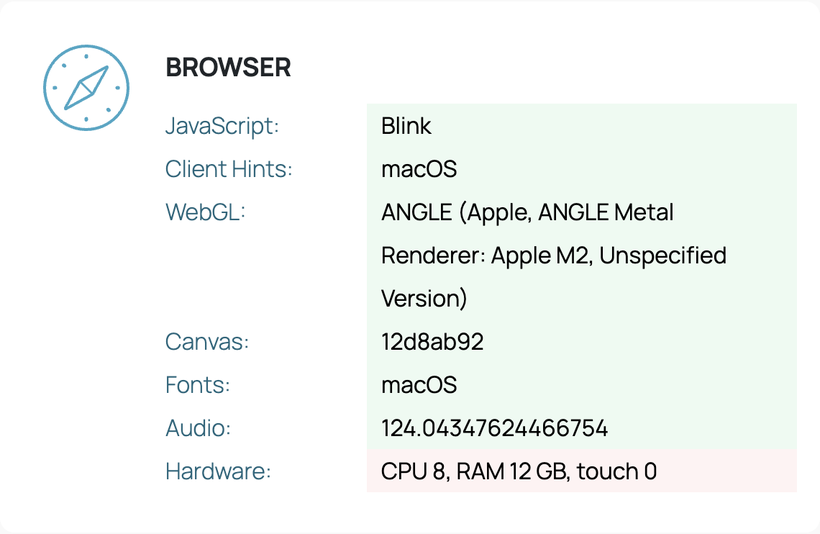
A computer can have them. A browser can't. Let's see what a browser says about hardware and which numbers it never reports.
What a browser says about hardware
A website can read three numbers.
- CPU. How many cores the processor has.
- RAM. How much memory there is, in gigabytes.
- Touch. How many touches at once the screen understands. For a regular monitor that's zero.
Memory has a catch. An exact number would stand out too much, so the browser rounds it to a power of two: 2, 4, 8. A real browser never says 6 or 12, however much memory the computer has. Firefox and Safari don't report memory at all, and the row simply has none.
What Whoer checks
Whoer judges only what can't be mistaken.
- Memory that is not a power of two. For example 6, 12 or 24.
- Zero cores or a fractional number of them.
- The browser calls itself an iPhone or an iPad, and there are zero touches. A phone always has a touch screen.
And here's what Whoer doesn't judge. A laptop with touches: touch screens exist. Android with no touches: TVs and set-top boxes on Android honestly report zero.
The row shows one of three things:
- Numbers on green. Compared, nothing odd.
- Numbers on red. One of them is a value a real device doesn't have.
- N/A. The browser gave no numbers at all.
Such a value takes up to 20% off your anonymity score. If neighbouring checks of the same kind fired too, such as WebGL or Fonts, Whoer treats them all as one signal and deducts once.
Where such values come from
The numbers were typed in by hand
In a browser with profiles the hardware is set in the settings. Typing in the real 12 or 24 GB seems logical, but a real browser would say 8.
An iPhone in the browser's name on a computer
An extension changes the User-Agent to an iPhone, and the computer's screen has no touch. A phone without a touch screen is something a website notices at once.
An extension with random values
Some privacy extensions put in random numbers. A random number rarely looks like a real one.
How to fix it
Keep the real values
The simplest thing is to spoof nothing. A real browser rounds the memory and names the cores by itself.
Type in only what exists
Memory 4 or 8. Cores as a whole number: 4, 8, 12, 16.
For a mobile view, use device mode
Want to see a website the way a phone does? Open device mode in the developer tools. It changes more than the browser's name: it turns touches on as well.
What does not help
- A proxy or a VPN. They change the address, not the hardware.
- Private mode and clearing cookies. The numbers stay the same.
- A more believable User-Agent. The numbers don't depend on it.
How to check the result
Open Whoer again and look at the Browser card. If it worked, the Hardware row is green.
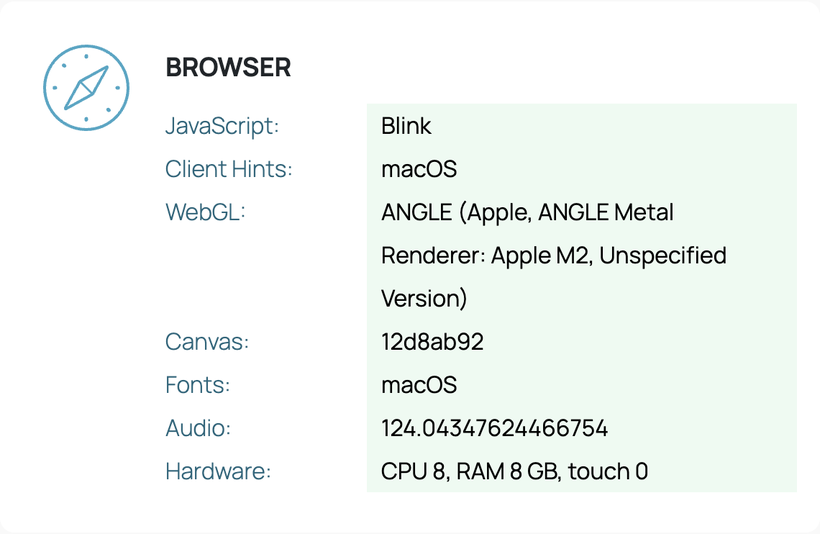
Numbers aren't the only way hardware shows. The browser reports the name of the graphics card too, and there's a separate article about the WebGL row.
Summary
It isn't a big number that gives a spoofed device away. It's an impossible one.
- The browser tells websites the cores, the memory and the touches.
- It rounds the memory to a power of two: 2, 4, 8. A real browser has no 12.
- Whoer marks only what's beyond doubt: such memory, fractional cores and an iPhone without touches.
- Real values fix it, or the ones a real browser can have.