

Middleman by delay: why your proxy is visible and how to fix it
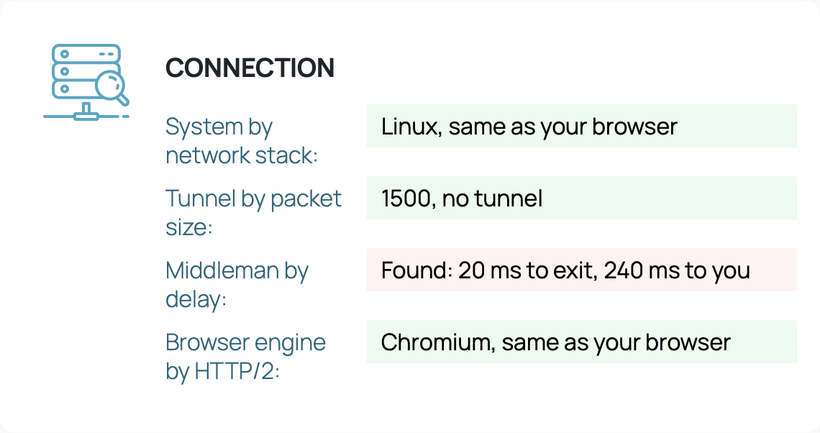
You picked a good proxy. The IP is residential, it's on no blacklist, the headers are clean. You open Whoer, and there's a red row in the Connection card: Middleman by delay: Found: 20 ms to exit, 240 ms to you. How does the site know someone is standing between you and it?
It doesn't know. It measured. The server timed your answers twice, and the two numbers didn't match. Let's see what those numbers are, why a proxy pulls them apart and how to bring them back together.
Two timings of one connection
When a browser opens a site over HTTPS, the connection is set up in two steps.
First comes TCP. The server sends a packet and waits for the acknowledgement. The round trip shows how far away the machine holding the connection is.
Then comes TLS, the encryption. The server sends its part again and waits for an answer. But only the browser itself can answer this one: it holds the encryption keys and nobody else does.
With no middleman both answers come from the same machine, yours. The times are almost equal: say, 20 and 26 ms.
What a proxy changes
A proxy (SOCKS5 or HTTP) doesn't forward packets. It opens its own TCP connection to the site. So the first timing is answered by the proxy.
Encryption is a different story. The proxy doesn't touch it, it just passes the encrypted data along. So the second timing is answered by your browser, and the answer takes the long road: from the site to the proxy, from the proxy to you and back.
Now there are two different numbers. The first shows the way to the proxy, the second the way to you. Whoer labels them exactly like that: to exit and to you. The gap between them is the road from the proxy to your device.
A VPN doesn't give itself away like this: it forwards your packets as they are, and your device answers both timings. But a VPN shows its packet size instead.
When the row fires
This check is done by the Whoer server closest to you. It measures three times in a row and takes the best result of each kind, so a random hiccup in the network doesn't spoil the picture. The rule after that is simple:
- Found. The second timing is longer than the first by more than 100 ms and by more than twice.
- None. The numbers are close.
- Numbers alone, no verdict. The gap is noticeable but below the threshold. Whoer shows the timings and doesn't count them against you.
- N/A. The check didn't finish in time, reload the page.
Take the example from the screenshot: 20 ms to exit and 240 ms to you. The gap is 220 ms and the second timing is 12 times longer. Middleman found. And 20 and 26 ms give a gap of 6 ms, which is ordinary jitter.
A found middleman takes up to 20% off your anonymity score. If other signs of a proxy fired too, such as proxy headers or open proxy ports, Whoer treats them all as one signal and deducts once.
A middleman is not always your proxy
Delay is a hint too, not a verdict. Sometimes the network opens connections on your behalf:
- satellite internet over distant satellites, where the operator runs a TCP accelerator that answers the first timing itself;
- an office network that sends all traffic through its own proxy in another city or country;
- Private Relay in Safari and similar services, which are proxies by design. Whether the row fires depends on how far their exit is.
Seeing a middleman with no proxy turned on? Try another network, a phone hotspot for example, and compare.
How to fix it
Start with the usual question: do you need to? Most websites don't measure time at all. The row matters where proxies are treated harshly: CAPTCHAs, extra checks, limited accounts.
You can't speed the proxy up. The delay comes from distance, not from bandwidth, and a gigabit plan changes nothing here. Only one thing helps: a shorter road between you and the exit.
Pick a proxy close to you
The gap between the timings is roughly the time it takes to get from the proxy to you and back. To keep the row quiet the gap has to stay under 100 ms. Inside one country or between neighbours that's usually the case. Across an ocean it's hard to fit.
Choosing one? See how a proxy differs from a VPN, when residential proxies are worth it and how SOCKS works.
That's no good if you need a proxy on the other side of the world. Then try the next option.
Move the browser next to the proxy
The row compares the way to the exit with the way to the browser. If the browser runs on a remote machine in the same region as the proxy, both ways are short. It can be a VPS or a remote desktop. You control the machine from far away, and the site sees a browser sitting right next to the exit.
One thing to keep in mind: Whoer notices a data center IP as well. So people usually keep a residential proxy from the same region on that remote machine.
Or let the packets through as they are
A VPN with a packet tunnel (WireGuard, IKEv2, OpenVPN) doesn't split the timings: your device answers both. But it leaves a trace of its own, the packet size. There's a separate article about it: Tunnel by packet size. You end up choosing between two traces, and only a nearby proxy removes both.
What does not help
- A faster plan or a faster line at the proxy. The delay comes from distance.
- Switching from SOCKS5 to HTTP or back. Both open the connection themselves. Shadowsocks, VLESS and Trojan work the same way.
- Another browser or private mode. The timing is taken on the server side.
- A chain of two proxies. The road to you only gets longer.
How to check the result
Open Whoer again and look at the Connection card. If it worked, the Middleman by delay row starts with None and the two numbers next to it are almost equal.
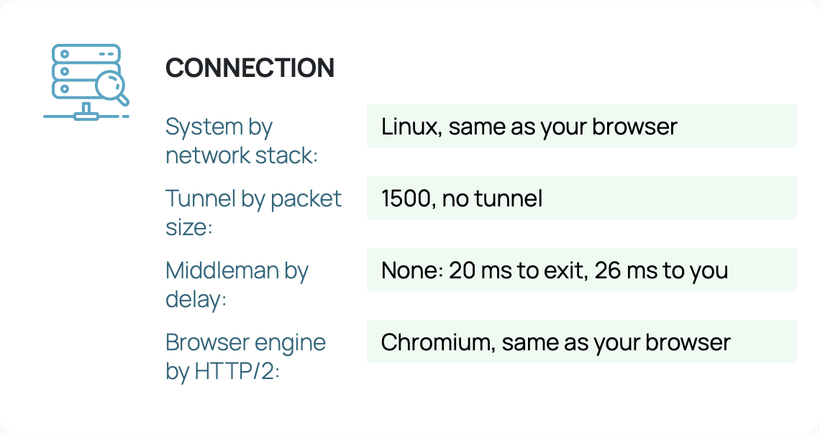
While you're there, glance at the row above, Tunnel by packet size. A clean connection says 1500, no tunnel.
Check your connection on Whoer
Summary
A proxy hides your address, but it can't hide time.
- The server times your answers twice: when the connection is set up and when encryption starts.
- The proxy answers the first timing, your browser answers the second. The farther you are from the proxy, the bigger the gap.
- Whoer reports a middleman when the gap is over 100 ms and the second timing is more than twice as long.
- A short road fixes it: a proxy in your region or a browser on a machine next to the proxy.