

System by network stack: why a website sees another OS and how to fix it
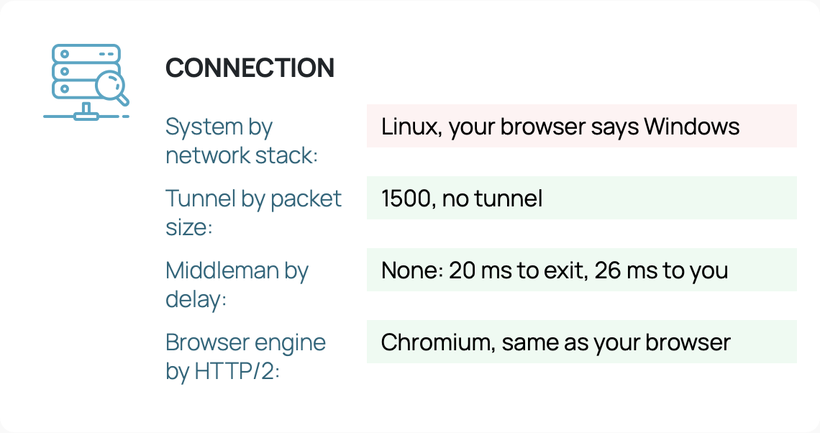
You're on Windows, and your browser honestly says so. You open Whoer, and there's a red row in the Connection card: System by network stack: Linux, your browser says Windows. What Linux?
Most likely it isn't your computer at all. It's the machine you went online through. Let's see how a server learns the system without asking the browser a single question, and why the answer is sometimes not about you.
How a system signs its packets
Every connection starts with one small packet called SYN. It is built not by the browser but by the kernel of the operating system. And every kernel builds it in its own way:
- the order in which the connection options are listed;
- the size of the receive window named at the very start;
- how many hops the packet is allowed to live. Linux, macOS and iOS set 64, Windows sets 128.
Together that makes a handwriting. Windows, Linux and macOS write the first packet differently. You can't fake that handwriting from the browser: the browser simply can't reach that deep.
One detail about phones. Android runs on the Linux kernel, and iPhone and iPad share their kernel with macOS. So for an Android phone the right answer is Linux, and for an iPhone the right answer is macOS.
What Whoer compares it with
In every request the browser names its system in the User-Agent string. The Whoer server closest to you reads the handwriting of the first packet and puts the two answers side by side. The row shows one of four things:
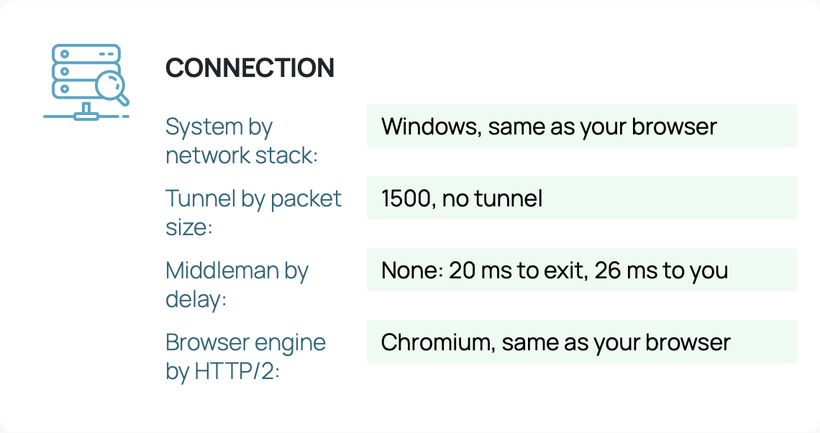
- Windows, same as your browser. The handwriting and the browser's words agree.
- Linux, your browser says Windows. They don't, and the row turns red.
- A system name alone. The handwriting fits several systems at once, or the browser didn't name its own. No verdict, and it isn't counted against you.
- N/A. The check didn't finish in time, reload the page.
A mismatch takes up to 20% off your anonymity score. If neighbouring checks of the same kind fired too, such as browser headers that disagree or a graphics card from another system, Whoer treats them all as one signal and deducts once.
Where the other system comes from
There are usually two reasons.
A proxy
A proxy opens the connection to the website itself, so its kernel builds the first packet. Most proxy servers run Linux. Mobile proxies are served from phones and modems, and that's Linux as well. Meanwhile your browser runs on Windows or on a Mac and honestly says so. The website sees both Linux and Windows in one connection.
A spoofed User-Agent
An extension, a privacy setting or a special browser tells websites another system. The handwriting of the first packet stays real.
A VPN has nothing to do with this. It forwards your packets as they are, together with the handwriting of your kernel. A VPN leaves a different trace, the packet size. A home router doesn't change the handwriting either.
Less common cases are an office network with a proxy and Private Relay in Safari: there someone else's server opens the connection for you.
How to fix it
There is one rule: the system in the first packet and the system in the User-Agent have to match. You can change either side.
Don't spoof the system in the User-Agent
If an extension or a setting causes the mismatch, bring the real User-Agent back. Naming another browser can still work, but another system shows almost every time. For the details see how to change the User-Agent in a browser.
Pick a proxy that fits your system
Some proxy providers can send the first packet in the handwriting of the system you need. In the settings it is called TCP fingerprint or passive OS fingerprint. Ask your provider whether they have this option and choose the system your browser names.
Work from the same system as the exit
A proxy on Linux and a browser on Linux agree by themselves. So do a mobile proxy and a browser on Android: both run the Linux kernel.
Move the browser to a remote machine
A browser on a remote desktop goes online straight from that machine, with no proxy. Its kernel builds the first packet, and the User-Agent names the same system. Windows on the server and Windows in the browser match.
What does not help
- Changing the TTL in your system. With a proxy the first packet is still built by the proxy. And with no proxy Whoer looks at the order of the options first, and TTL doesn't change that.
- Another browser on the same computer. The system builds the first packet, not the browser.
- Private mode and clearing cookies. The check works below the browser.
- Another country or server at the same proxy. The system at the exit stays the same.
How to check the result
Open Whoer again and look at the Connection card. If it worked, the row shows the name of your system and the words same as your browser.
A proxy can still give itself away by time. Glance at the Middleman by delay row, there's a separate article about it.
Check your connection on Whoer
Summary
You can call the browser anything you like, but the system writes the first packet.
- The kernel builds the first packet of a connection, and every system has its own handwriting.
- The website compares that handwriting with the system in the User-Agent.
- Most often a proxy brings the other system: its server builds the first packet.
- Matching fixes it: an honest User-Agent, a proxy with the handwriting of your system or a browser on the same system as the exit.