

Virtual machine: why a website knows about it and how to fix it
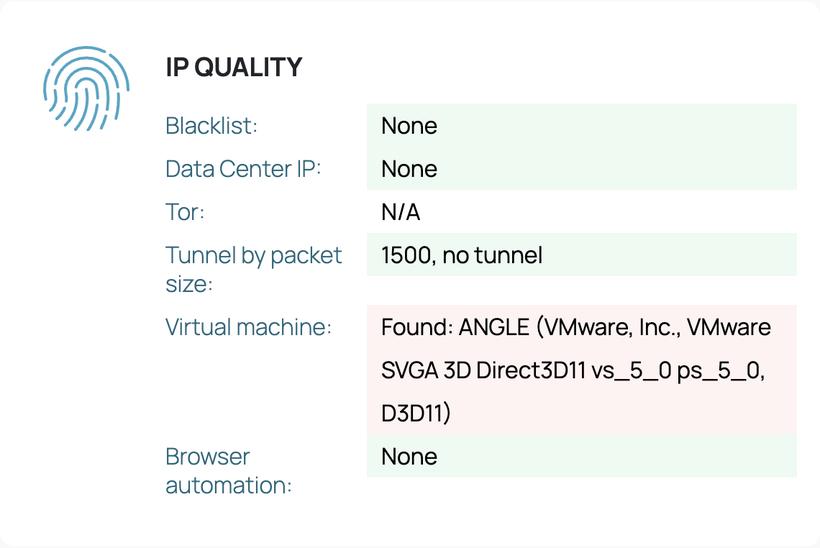
You work inside a virtual machine. A separate system, a clean browser, your own proxy. You open Whoer, and there's a red row in the IP Quality card: Virtual machine: Found, followed by a long name with the word VMware in it. How did the website look underneath the browser?
It didn't. The browser told it. Let's see what exactly the browser says and whether you can change it.
How a browser gives a virtual machine away
Every modern browser can draw 3D graphics, the technology is called WebGL. So that a website can adjust to the hardware, the browser tells it the name of the graphics card and its driver. On a regular computer that's something like NVIDIA GeForce, Intel Iris or Apple M2.
A virtual machine has no real graphics card. A virtual graphics driver stands in for it, and it honestly names itself: VMware SVGA 3D, VirtualBox Graphics Adapter, Parallels Display Adapter. That name gets into the browser, and from the browser to any website that asks.
What Whoer looks for
Whoer reads this string and looks for the names of virtual machines in it: VMware, VirtualBox, Parallels, QEMU, KVM, Hyper-V, Xen. The row shows one of three things:
- None. The string was read and there are no virtual machine names in it.
- Found and the name of the driver. The driver named the virtual machine itself.
- N/A. The browser didn't give the name: WebGL is off or hidden. No verdict.
A virtual machine takes up to 30% off your anonymity score. It also lowers the percentage in the IP Quality card itself: that one starts at 100 and loses the weight of every check that found something.
Why websites care
A regular person rarely visits a shop or a bank from a virtual machine. But they are a handy way to keep dozens of identical systems. So fraud protection treats a virtual machine as a reason to look closer: show a CAPTCHA, ask for a confirmation, hold an account.
A virtual machine breaks no rules by itself. Developers, testers and simply careful people sit in them every day. For how it works together with a VPN see VPN plus virtual machine.
Where it comes from
You really are in a virtual machine
VirtualBox, VMware, Parallels on a Mac, Hyper-V on Windows. The guest system gets a virtual graphics driver, and its name shows in the browser.
A cloud desktop
A rented computer in the cloud is often a virtual machine too. If its graphics card is virtual, the row fires there as well.
How to fix it
The rule is simple: a real computer has a real graphics card.
Work from your main system
A separate browser profile on a regular computer shows no virtual machine, because there isn't one.
Take a real remote machine
A dedicated computer or a server with a graphics card instead of a virtual machine. A browser on it names real hardware.
Give the guest system a real graphics card
Some virtualization software can pass a graphics card through to the guest system. Then the driver names the card and not itself. It isn't easy to set up, and not every computer can do it.
What does not help
- Changing the User-Agent. The driver name doesn't depend on it.
- A proxy or a VPN. They change the address, not the hardware.
- Private mode and clearing cookies. The graphics card stays the same.
- Renaming the virtual machine. The driver's name is built into the driver.
- Turning WebGL off. The row shows N/A and there's no verdict. But a browser without WebGL is rare by itself, and many websites work worse without it.
How to check the result
Open Whoer again and look at the IP Quality card. If it worked, the Virtual machine row says None.
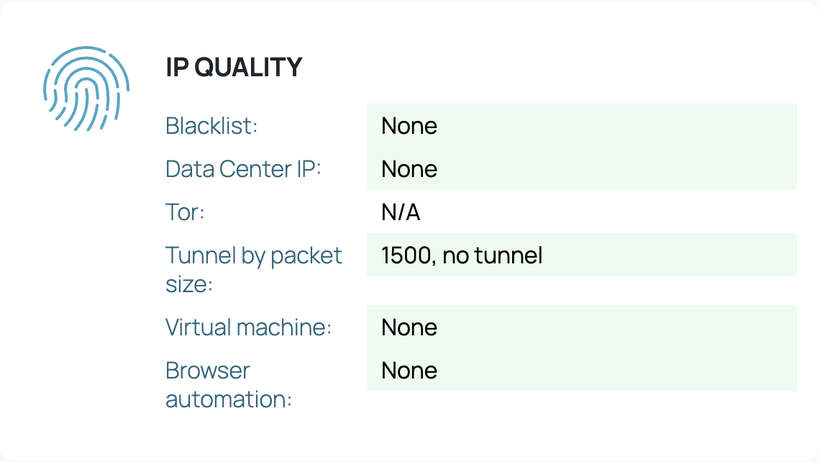
Want to see the name of the graphics card itself? Click the row, and Whoer opens it in the tab with details.
Summary
It isn't the address or the system that gives a virtual machine away. It's the graphics driver.
- The browser tells websites the name of the graphics card and its driver.
- A virtual machine has a virtual driver, and it names itself.
- Whoer looks for VMware, VirtualBox, Parallels and other names in that string.
- Only real hardware helps: the main system, a dedicated machine or a passed-through graphics card.