
Graphics card by WebGL: why a website sees another system and how to fix it
You have a Mac, and websites should think it's a Windows computer. You changed the system name in the browser. You open Whoer, and there's a red row in the Browser card: WebGL with the name of an Apple M2 graphics card. The system says Windows, and the graphics card is Apple's.
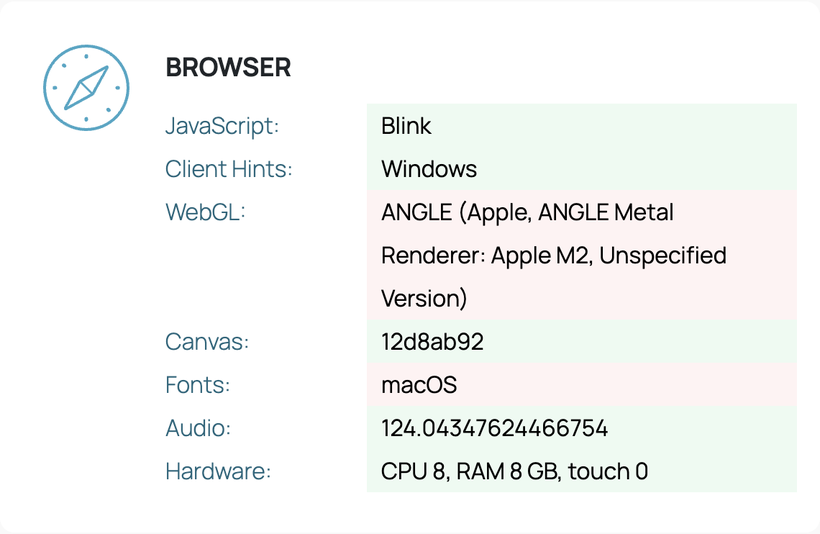
You changed the name of the system, and the hardware stayed the same. Let's see what a browser says about the graphics card and why it reveals the system.
What the WebGL row is
A browser can draw 3D graphics, the technology is called WebGL. So that a website can adjust to the hardware, the browser tells it the name of the graphics card. Whoer shows that name in the WebGL row.
Some graphics cards exist on one system only. That's where the comparison comes from.
| The browser names the system | The graphics card names itself | Why it doesn't happen |
|---|---|---|
| Windows or Linux | Apple | Apple chips are found in Apple devices only |
| iPhone or iPad | NVIDIA | Apple phones and tablets have no such graphics cards |
| Android | GeForce or Radeon | Those are graphics cards for computers, not for phones |
What the row shows
- A graphics card name on green. Whoer read it and it doesn't contradict the system.
- A graphics card name on red. The graphics card is from another system.
- A name with no colour. The pair is rare but real, and Whoer doesn't judge it.
- N/A. The browser didn't give the name: WebGL is off or hidden.
The rare real pairs are an old Mac with an NVIDIA card, Linux on an Apple computer and Android on a Tegra chip. Whoer knows about them and gives no verdict.
A mismatch takes up to 20% off your anonymity score. In the screenshot above the Fonts row is red as well: they share one cause. Whoer treats such checks as one signal and deducts once.
Where the other graphics card comes from
A spoofed system in the User-Agent
The most common case. An extension or a setting tells websites another system. The graphics card stays real.
A profile from another system
A browser with profiles shows websites Windows and runs on a Mac. If the graphics card in the profile was left real, you get Windows with an Apple chip.
The graphics card itself was spoofed
It happens the other way round too: the system is real, and someone else's graphics card name is typed in. The result is the same.
How to fix it
There is one rule: the graphics card has to be one that the named system can have.
Name your real system
Turn off the extension or the setting that changes the User-Agent. For the details see how to change the User-Agent in a browser.
Work from the system you name
Need Windows? Take a computer or a remote machine with Windows. Then the graphics card, the fonts and everything else match by themselves.
In a browser with profiles, pick a graphics card that fits the system
If the profile says Windows, choose a graphics card that exists on Windows. Don't leave the real Mac graphics card under another system.
What does not help
- A proxy or a VPN. They change the address, not the hardware.
- Private mode and clearing cookies. The graphics card stays the same.
- Turning WebGL off. The row shows N/A, but the fonts and other rows still show the mismatch.
How to check the result
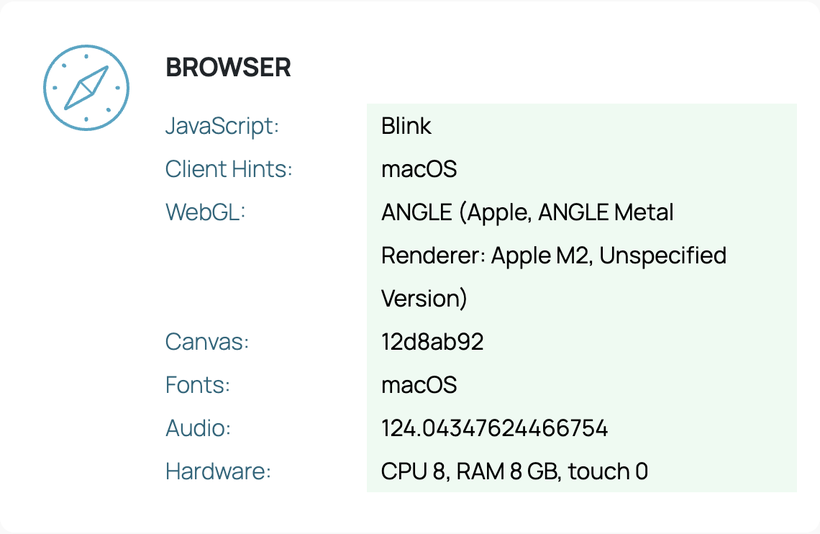
Open Whoer again and look at the Browser card. If it worked, the WebGL row is green.
The graphics card isn't the only thing that gives the system away. In the Connection card it shows in the first packet, and there's a separate article about that.
Summary
You can name any system you like, but the graphics card names itself.
- The browser tells websites the name of the graphics card.
- Some graphics cards exist on one system only, and they reveal a spoofed one.
- A mismatch usually comes from a spoofed User-Agent or a profile from another system.
- Matching fixes it: the real system or a graphics card the named system can have.