

Canvas fingerprint: why noise shows and how to fix it
You installed an extension that protects you from tracking. It promises websites will no longer recognise you by your fingerprint. You open Whoer, and there's a red row in the Browser card: Canvas. The protection works, and it's exactly what got noticed.
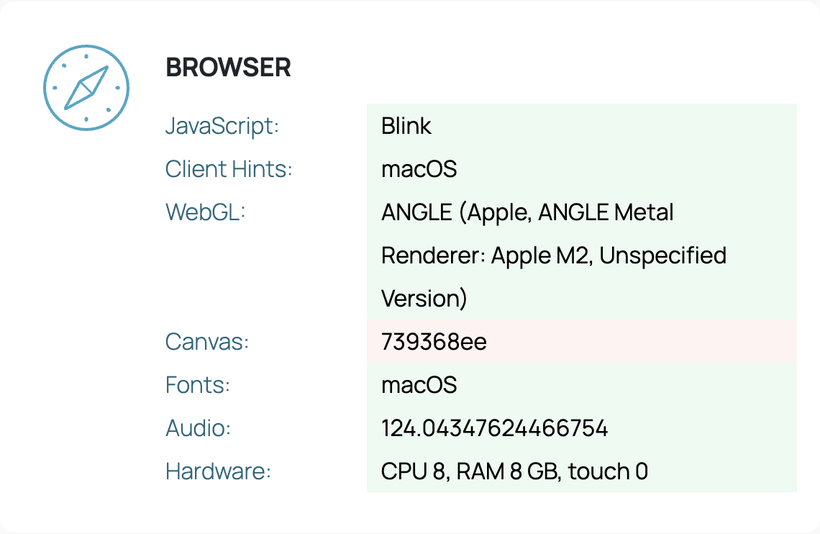
It happens a lot: the mask stands out more than the face. Let's see what a Canvas fingerprint is and how a website can tell it was touched.
What a Canvas fingerprint is
Canvas is a surface a page can draw on. A website asks the browser to draw a line of text and a coloured block, and then reads the picture back.
To the eye the picture is the same for everyone. But graphics cards, drivers and fonts differ between devices, and single pixels come out slightly different. Fold the picture into a short code and you get a fingerprint. In the Canvas row on Whoer it's eight characters.
One device gives the same fingerprint today, tomorrow and a month from now. For more about fingerprints see unique browser traces.
How Whoer notices noise
Fingerprint protection usually mixes random noise into the picture: it changes a few pixels on every read. The fingerprint is new each time, so a device can't be recognised by it. But a real browser doesn't behave like that, and it's easy to check.
- Whoer draws one picture and reads it twice. A real browser returns the same thing both times.
- It draws the same picture on a second canvas. The fingerprint has to match too.
- It fills a square with one known colour and reads the pixels. The colour has to come back the same.
- It checks whether the function a page reads the canvas with was replaced.
The row shows one of three things:
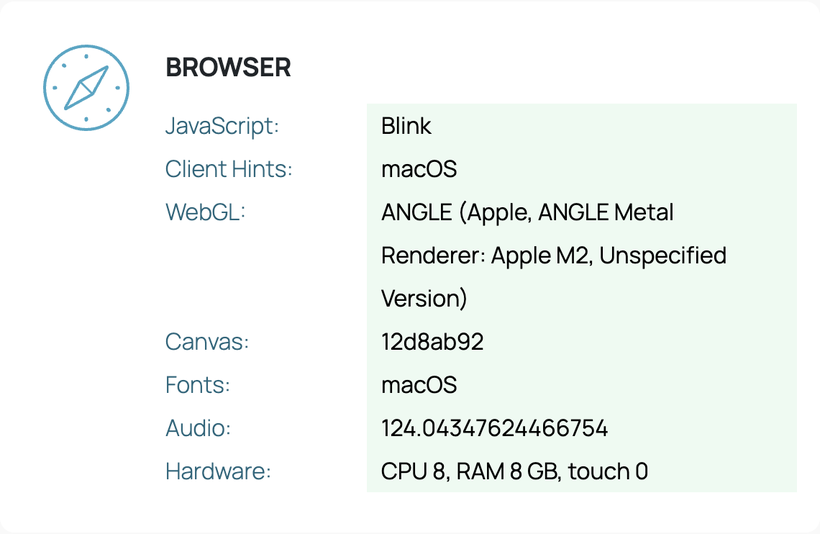
- A code on green. Everything was measured and there's no noise.
- A code on red. The reads differ, the colour came back wrong or the reading was replaced.
- N/A. The canvas couldn't be read.
Noise takes up to 10% off your anonymity score. If the Audio row is red as well, Whoer treats them as one signal and deducts once.
Why noise stands out more than a fingerprint
With a real fingerprint you are one of thousands of people with the same computer and the same graphics card. With noise you are a person whose picture changes on every read. There are few of those. The website won't recognise your device, but it knows for sure that you are hiding something.
Where noise comes from
A privacy extension
Fingerprint blockers work exactly like this: noise on every read.
A protection mode in the browser itself
Firefox with the privacy.resistFingerprinting setting and Tor Browser give websites a picture that isn't the real one.
A browser with profiles in noise mode
Profile settings often offer a choice for Canvas: real or noise. Noise gives a red row.
How to fix it
Turn the noise off
Disable the extension or add the site to its exceptions. In Firefox put the privacy.resistFingerprinting setting back to its default.
In a browser with profiles, pick the real Canvas
A real picture from a real device matches thousands of others and raises no questions.
Don't want websites to recognise you?
It's more reliable to keep a separate browser profile for a separate task and to clear cookies. That doesn't change the fingerprint, but it leaves no traces that make visits easy to link.
What does not help
- A proxy or a VPN. The browser draws the picture, not the network.
- Private mode. The fingerprint is the same there, and an extension with noise may work in it too.
- Changing the User-Agent. It has no effect on the canvas.
How to check the result
Open Whoer again and look at the Browser card. If it worked, the Canvas row is green. Reload the page a couple of times: the code should stay the same.
Summary
Noise hides the fingerprint and gives the protection itself away.
- A Canvas fingerprint is the code of a picture your browser drew.
- A real browser draws the same picture the same way any number of times.
- Whoer reads the picture twice and sees the noise at once.
- The real Canvas fixes it: no extension with noise and no noise mode in the profile.